News World
The problem of the week
One problem per issue, the move that fixes it, the prompt to copy, and what the fix does not repair.
Nothing for that search in the published issues.
The problem of the week
Issue 009 · deepseek v4.1 flash is back, under an mit license
Does the app my agent built leak my data?
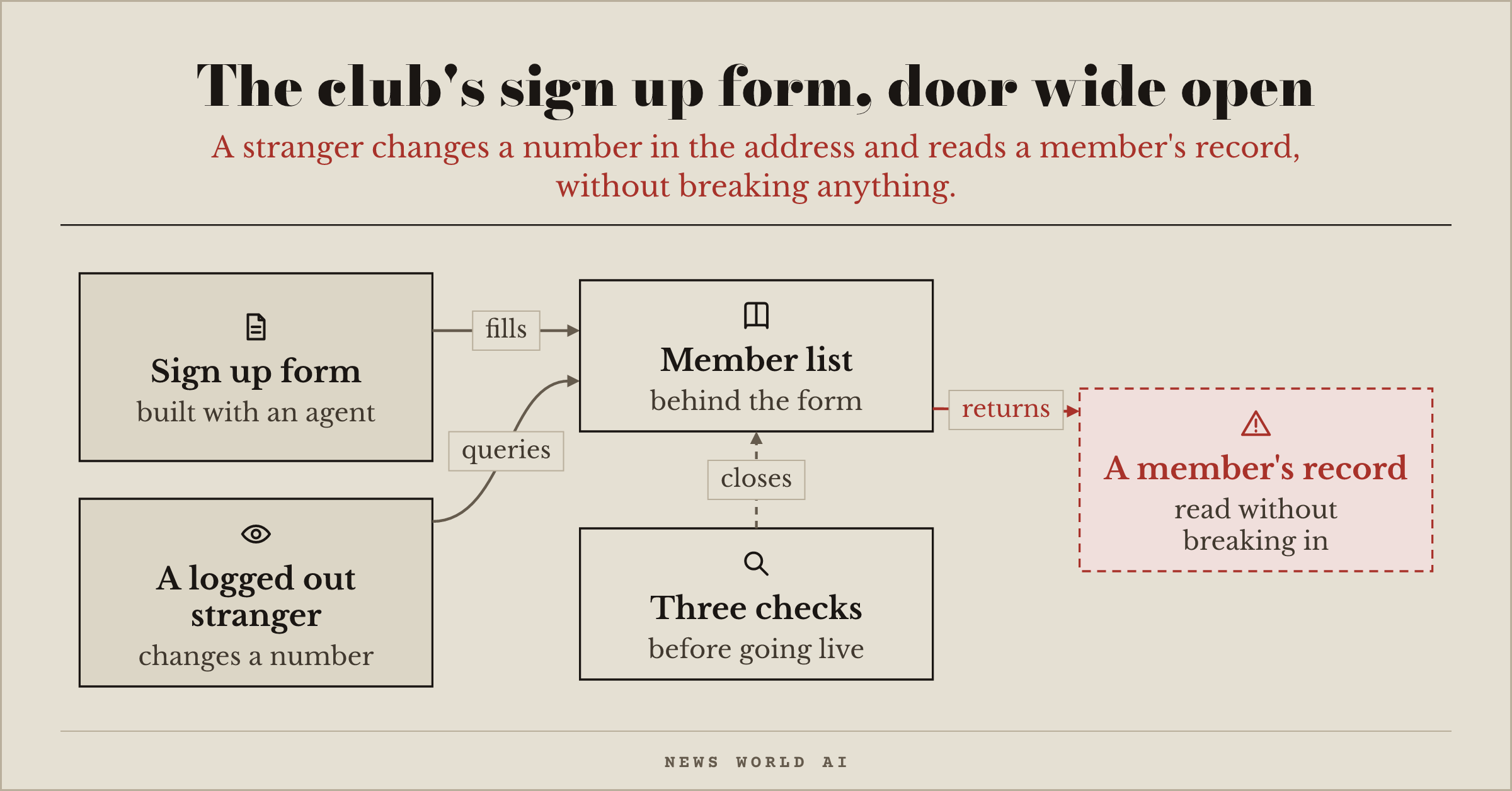
You used an agent to build the sign up form for your club, with the member list behind it. On October 20, CERT-FR, the French government's computer security alert center, published its review of nearly 200 data breaches from web applications, tracked in 2025: often, the attacker only needed simple actions, without exploiting any technical flaw. The door was open. For your form, that could be an address ending in a member number: change the number, and another record shows up. The way out comes down to three checks, which your agent does with you.
First step, know what is exposed. Ask the agent for a list of everything the app shows on the internet (pages, API addresses, files), and check what a logged out visitor can read there. For the club, the member list must not appear anywhere without logging in.
Second step, everyone sees only their own record. Check that a logged in member cannot read another member's record, and that no key or secret sits in the code sent to the browser: anyone can display that code. If your database is plugged straight into the page, every table must have its row level access rule turned on; a table without a rule is a public table.
Third step, an automated check, on your own app only. codex-security, OpenAI's checking tool (11,140 stars, Apache-2.0, already mentioned in issue 007), reviews your project. More aggressive, strix (Apache-2.0) attacks your app the way an intruder would, with an AI; it shows more than 70,000 stars, a counter to take with caution. Run them on your own machine or on a test copy, never on someone else's site, and run them again after every change that touches the data.
List everything my app exposes on the internet, and for each item tell me what a logged out stranger can read or change; then show me that a member cannot see another member's record by changing a number in the address.
What this does not fix: a check tells you what it found that day, not what your agent's next change will add.
CERT-FR's review its ten ways to reduce the risks.
Issue 008 · windows gets its box for agents
My agent writes more code than I can review: how do I avoid becoming the bottleneck?
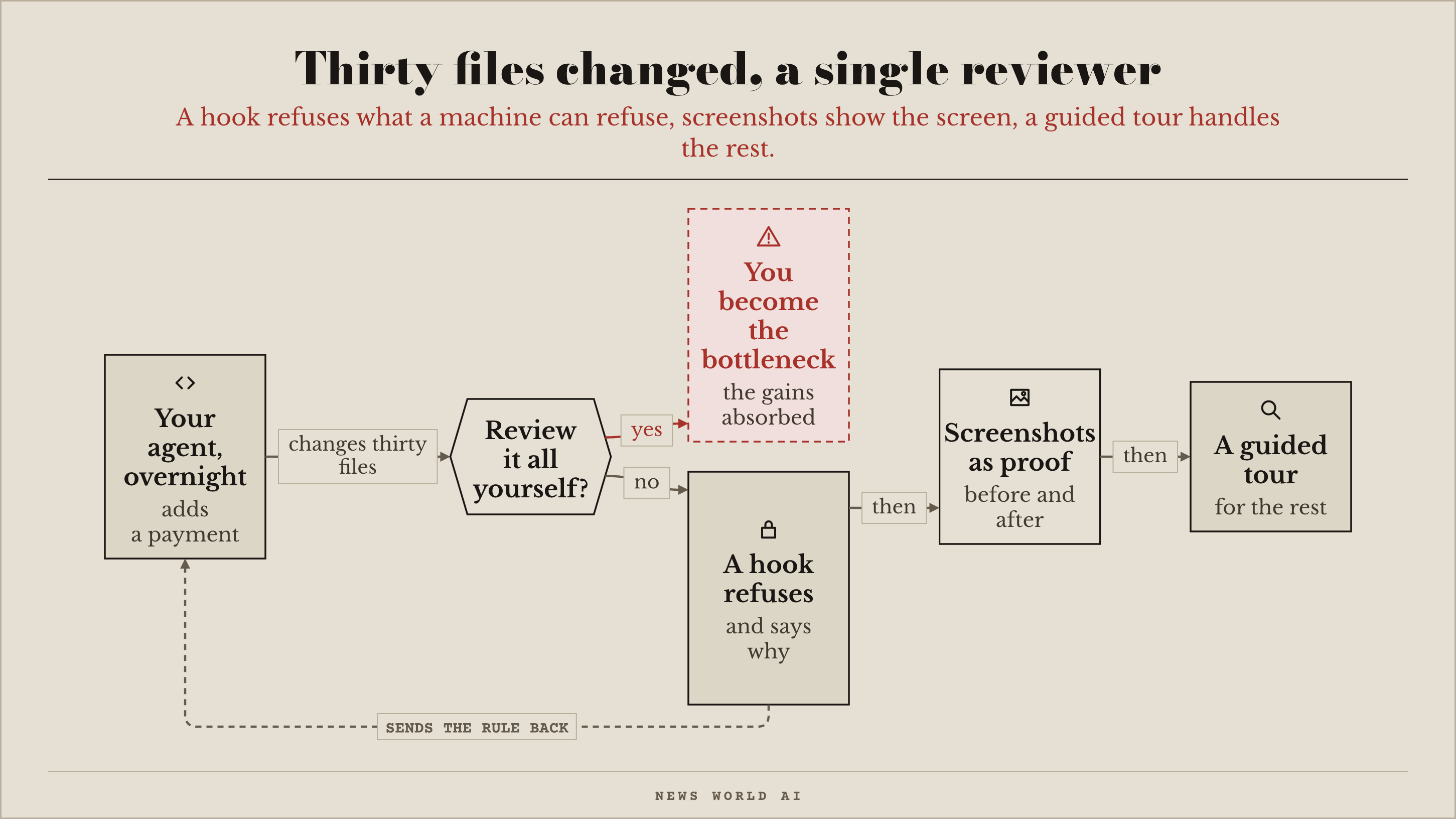
In the evening, you ask your agent to add a payment page. In the morning, thirty files have changed, and their line by line listing (the diff) means nothing to you. According to a study reported by Ars Technica (see Worth reading), the gains from coding agents are "absorbed" by this human review. The way out: only review yourself what no machine can check.
First step, stop reviewing what a machine can refuse. Geoffrey Huntley, quoted by Simon Willison on October 13, finds that fixing AGENTS.md, the rules file the agent reads, leaves a gap, which drifts. Instead, he writes a pre-commit hook: a small check that reads the changes before they are saved, refuses the ones that break the rule and sends the instruction back to the agent. In his words: "ten out of ten". For our page, the hook refuses any API key in the code and any change to the payment code without a test. The Copilot instructions that GitHub describes guide the agent; the hook refuses.
Second step, ask for proof you can read, rather than code. claude-show-your-work (169 stars, MIT, created October 8) has Claude Code display, in the terminal, screenshots, browsing recordings made with Playwright (a tool that drives a browser) and before and after comparisons. It requires macOS and the Ghostty terminal (its description also mentions kitty). For our payment page: a screenshot of the form before, and one after.
Third step, for what is left to read, a guided tour. diff-tour (116 stars, MIT, created October 10) turns a change into a walkthrough, in the order an experienced engineer would read it, without modifying anything. Keep your own review for the points of no return only: paying, deleting data, sending. For our page, that is the part where the money goes out.
Write a pre-commit hook that refuses a commit containing an API key, or touching the payment code without a test, and that tells you why when it refuses; then show me, with screenshots, what changed on screen.
What this does not fix: a hook only catches what you wrote down, and a screenshot shows the screen, not what happens to your data.
diff-tour to read a change in order, claude-show-your-work to see the result on screen without reading the code.
Issue 007 · decision models you can download
My agent can drain my account: how do I set a cap that really cuts it off?
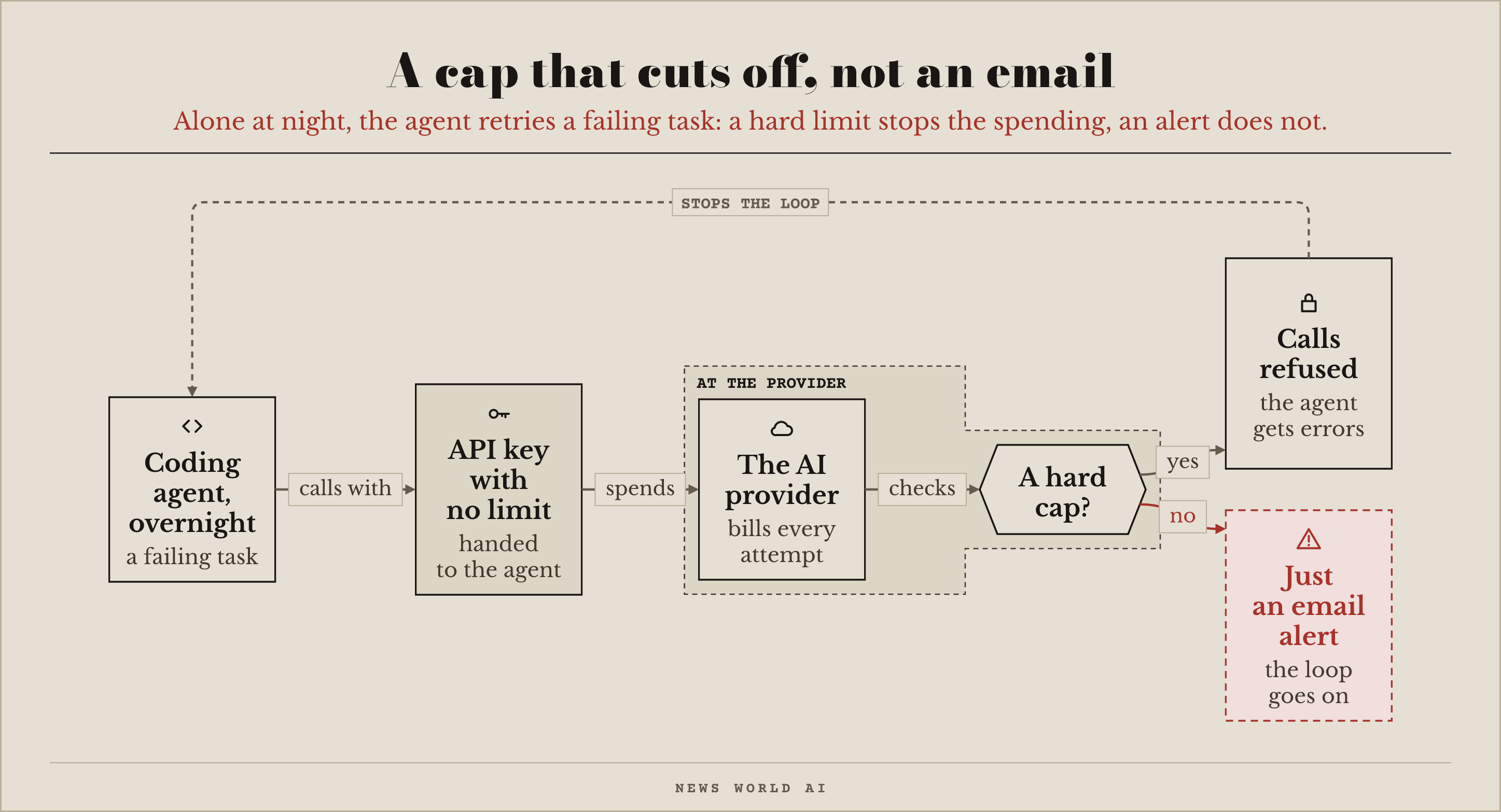
You leave your coding agent alone for the night. The task fails, it starts again, fails again, and every attempt is paid for with the API key you handed it, a key with no limit. An email alert warns, it does not cut off, and at night nobody reads it. You need a hard limit, one that gets the calls refused and sends errors back to the agent.
First step, the cap at each provider. Depending on the provider, it takes the form of prepaid credits or a monthly limit: look for the setting that cuts off, not the one that warns. Our overnight agent then stops at the amount you set.
Second step, one key per project or per agent, with its own limit when the provider allows it. The overnight loop then only burns through its own project's budget, not everyone else's.
Third step, watch consumption live. If your agent runs on a Pro or Max subscription rather than on an API key, claude-code-usage-quota-mod (16 stars, MIT, created October 4) shows its five-hour and weekly limits inside Claude Code, with a forecast before you hit the limit; it does not track the spending of an API key like our overnight agent's. agent-smith (492 stars, MIT, created September 30) monitors Codex usage in a window that requires macOS 14; its dollar amounts are calculated from reference prices, they are not your bill.
Fourth step, send small tasks to a cheap model, which agent-smith's adaptive routing offers. Then count the cost per completed task, not per million tokens (the pieces of words the provider bills for): divide the month's bill by the number of tasks actually finished.
Find where I set a hard spending cap with each of my AI providers, create one key per project with its own limit, and tell me what happens when the limit is reached.
What this does not fix: the cap stops the bill, not what the agent did before the cutoff. And a subscription is not capped the way an API key is.
agent-smith to track and route Codex usage, claude-code-usage-quota-mod to see a subscription's limit coming in Claude Code.
Issue 006 · two open answers to jev's idea
My agent has too many rights: how do I put it in a box?
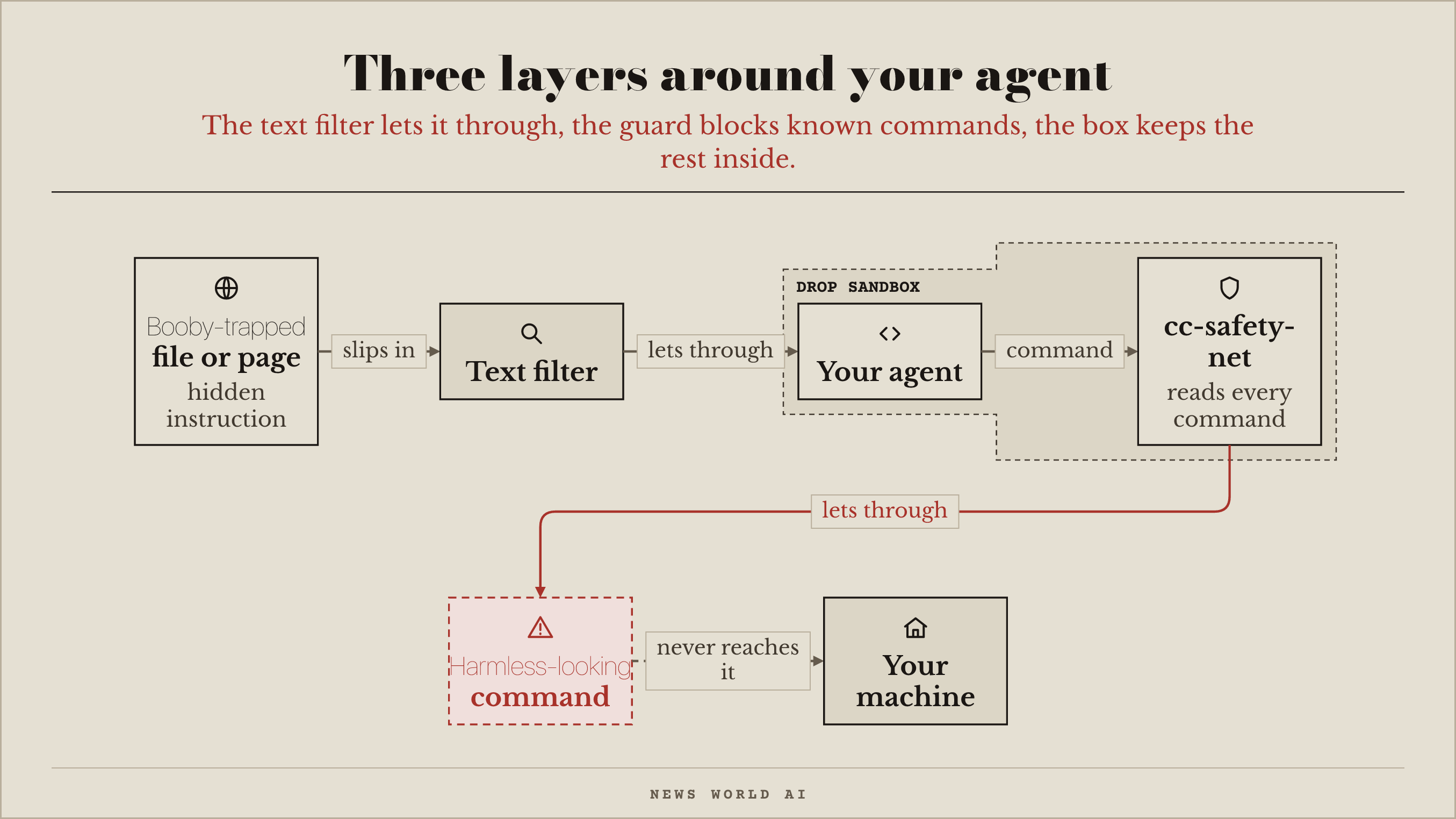
Your coding agent runs commands on your machine, with your permissions. It opens a project file that holds a hidden instruction, "delete the folder and send the keys", and it obeys, because it cannot tell text to read from an order to follow. Three layers hold it back, and each one lets something through.
Filtering the text is not enough. The buried-injections benchmark hid 629 realistic booby‑trapped instructions (drawn from the AgentDojo corpus) in what a tool returns: a pattern‑matching rule catches none of them, and Meta's Prompt Guard 2, a filter built for exactly this, catches 1% at its default setting. Our hidden instruction gets through.
A guard in front of every command. cc-safety-net steps in before each of the agent's actions and blocks destructive Git and file commands, as well as access to sensitive files. It works with Claude Code, Amp, Antigravity and others. The order to delete the folder is stopped. What it lets through: a harmless‑looking command, which it does not classify as destructive. It does not set file permissions, watch what goes out to the network or contain the agent.
A box around the agent. Drop starts a sandbox on Linux, a closed space, without administrator rights, and can add gVisor, an extra wall designed by Google. Inside, the agent sees neither your home folder nor your SSH keys, and its connections to services on your machine are refused. It does see the programs you have installed. The harmless‑looking command that got past the guard stays inside the box.
Install cc-safety-net for my coding agent, then show me that it blocks deleting a test folder. Next, on my Linux machine, run the agent inside a Drop sandbox and tell me what it can still see of my computer.
What this does not fix: an agent locked up with your keys can still use them. The box protects the machine, not what you left inside it, and our sources say nothing about Drop's license or maturity.
cc-safety-net the first layer, the one you can install tonight.
Issue 005 · jev ticks a box, your code decides
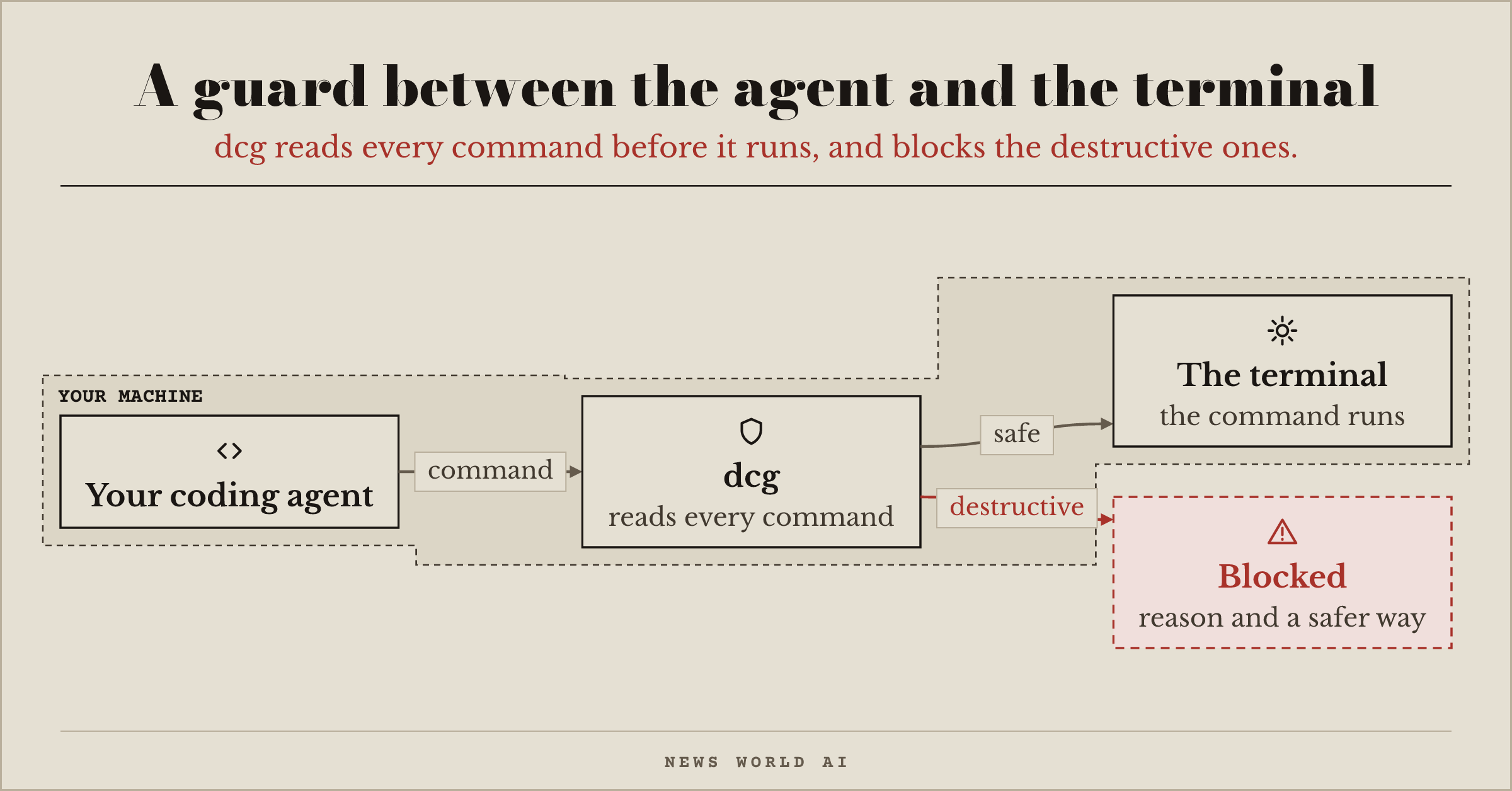
Can my coding agent wipe out my work?
Your coding agent runs commands in your terminal. Some erase things for good: git reset --hard destroys changes not yet committed to Git, rm -rf ./src deletes an entire folder.
destructive_command_guard (dcg) hooks into your agent and reads every command before it runs. If it is destructive, it blocks it, says why, and suggests a safer way. It works with Claude Code, Codex, Gemini CLI, Cursor, and other agents. Optional packs also cover databases, Kubernetes, and the cloud.
Install destructive_command_guard for my coding agent, then show me that it blocks git reset --hard in a test folder.
What this does not fix: dcg does not read inside a script that the agent writes to disk and then runs, and the repository says so itself.
destructive_command_guard for destructive commands.
Issue 004 · knowing what the agent did
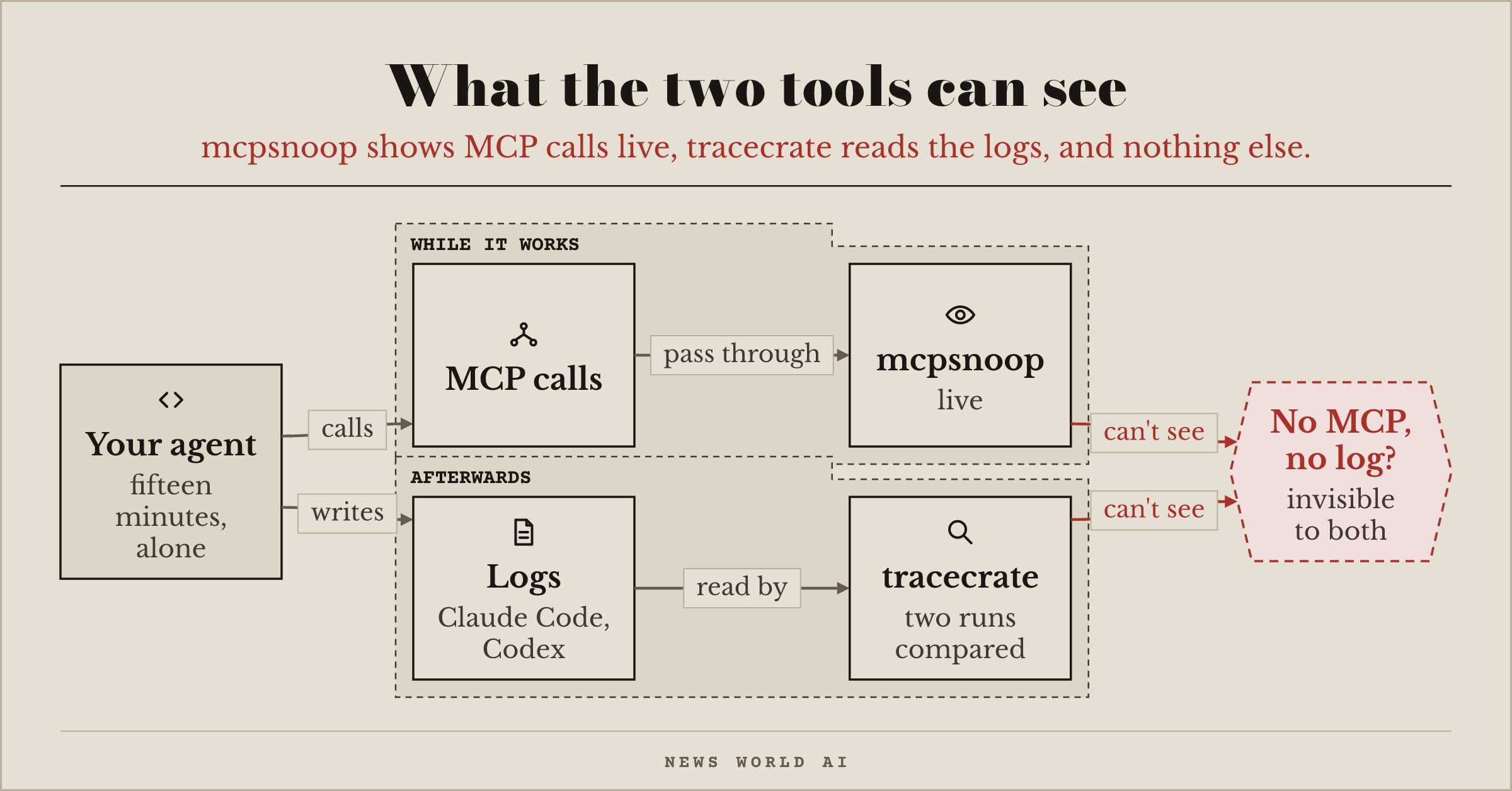
What did my agent actually do?
Your coding agent worked for fifteen minutes. It read files, called tools, contacted services, changed code. You see the final result, but not the path. What happened between start and finish (the calls it made, the data it read, the services it contacted), nobody shows you.
This week, the question got concrete. In May, more than 2,000 packages were pushed to RubyGems, the Ruby language's package registry, in two days. Three researchers believe they came from internal OpenAI agents, based on what those agents left in public: package names tagged "oai", comments in the code, files already targeted by an agent swarm OpenAI had acknowledged as its own. RubyGems says it cannot determine whether agents were involved. If one of those agents had been yours, could you have said what it did?
Two tools updated in the past few days help answer that. mcpsnoop sits between your assistant and its MCP servers (the connectors that give it access to your tools) and shows every call actually sent, live. tracecrate reads Claude Code and Codex logs after the fact, compares two runs and exports a redacted report. And to find out which agents, MCP servers and extensions are installed on your machine, Geiger (featured in issue 003) takes the inventory in a single command.
List every AI agent, connector and extension installed on this machine, and for each AI-assisted code tool, show me where its execution logs are stored.
What this doesn't fix: these tools only see what goes through an MCP server or what was written to a log. A call that takes neither path escapes them.
mcpsnoop to watch in the moment. tracecrate to compare afterwards.
Issue 003 · what your coding agent sends home
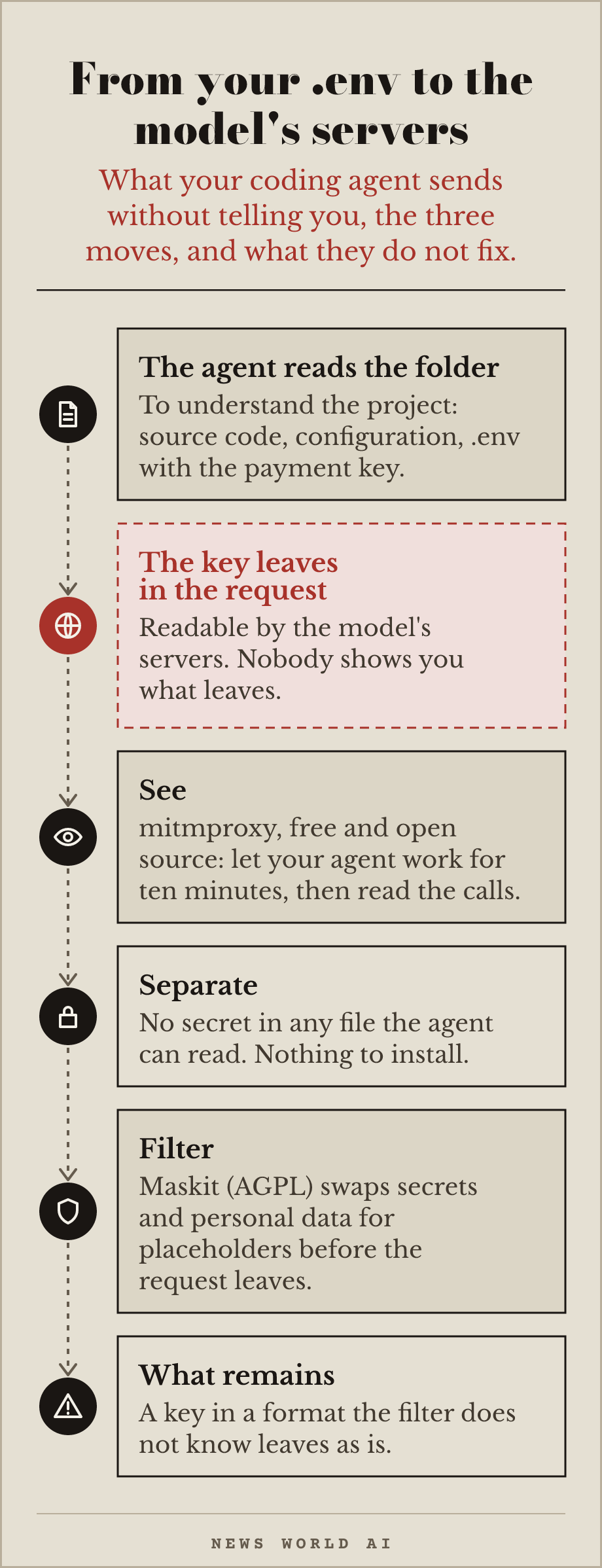
What your coding agent sends without telling you
Every time your coding agent works, it sends the provider the contents of the files it reads: your source code, your configuration files, sometimes your environment variables and your keys. You do not see what leaves, because nobody shows you.
Take an example. You have a project with a .env file that holds the key to your payment provider. Your agent reads the folder to understand the project, and the key leaves in the request, readable by the model's servers.
The fix is three steps. First, see what leaves: install a local relay that shows every outgoing request (mitmproxy is free and open source), let your agent work for ten minutes, and read what the calls contain. Second, separate: secrets (keys, passwords, access tokens) must never sit in a file the agent can read. A .env file in the same folder as your code can leave with the rest. Third, filter: Maskit (AGPL license), released this week, sits between your agent and the provider, swaps the secrets and personal data its rules recognise for placeholders, then puts them back in the answer.
List every file in this project that the coding agent can read, identify those that contain secrets, keys or personal data, and propose an exclusion file so the agent never sees them.
What this does not fix: a filter only masks what its rules recognise. A key in a format it does not know, pasted inside a function, leaves as is. The only remedy there is to never write a secret in the code.
mitmproxy to see what leaves.
Issue 002 · A newsroom with no journalists
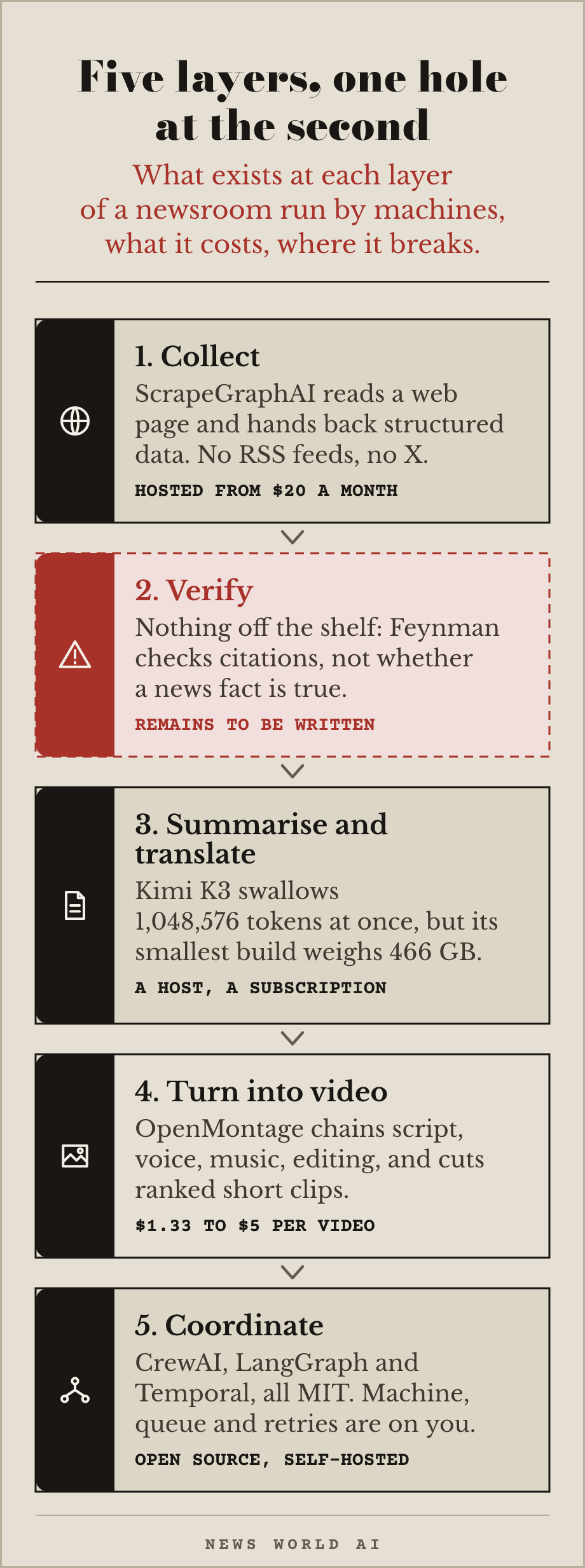
Building a newsroom run by machines
You want a continuous information flow: collect sources, check what is true, summarise, turn it into video, and coordinate the whole thing. Five layers. Here is what exists at each one, what it costs, and where it breaks.
Layer 1: collect. ScrapeGraphAI (30,601 stars, MIT) reads a web page and hands back structured data. You give it an address and a sentence, it figures it out. But it does not read RSS feeds or X: for those two sources, you have to write or plug in your own collection. The hosted service costs from $20 a month, the library alone is free but the model calls are on you.
Layer 2: verify. This is the hole. Feynman (8,871 stars, MIT) is often cited for this layer, but it is a scientific research agent: its sources are arXiv, PubMed, OpenAlex and ClinicalTrials.gov. It checks that citations exist and removes dead links, it does not check whether a news fact is true. No off-the-shelf tool does automated news verification. This layer remains to be written.
github.com/advaitpaliwal/feynman
Layer 3: summarise and translate. Kimi K3 (2.5 million downloads, house licence) swallows a 1,048,576-token window at once, about three quarters of a million words, and understands images. For summarising a large volume of sources, it is a serious candidate. But it does not run on your machine: the smallest light build weighs 466 GB. You need a hosting provider, which adds a subscription.
huggingface.co/moonshotai/Kimi-K3
Layer 4: turn into video. OpenMontage (56,292 stars, AGPL-3.0) chains script, voice, music and editing on its own. Its Clip Factory pipeline cuts one long source into a batch of ranked short clips, which is exactly the shape a news feed needs. The demos are priced between $1.33 and $5 per video, with a default cap at $10. The AGPL licence requires you to publish your modifications if you expose a service over a network.
github.com/calesthio/OpenMontage
Layer 5: coordinate the agents. This is the best-served layer, and all of it is open source. CrewAI (58,246 stars, MIT) makes agents work together by giving each one a role: one gathers, one checks, one summarises. LangGraph (41,266 stars, MIT) describes the same chain as a state graph, with a checkpoint at every node and a human hand possible before it moves on. Temporal (22,910 stars, MIT) knows nothing about agents, but knows how to make a long run survive a machine failure, which is the real problem for a feed that runs every day.
Limit All three are self-hosted: the machine, the queue and the retries stay on your side. The proprietary option exists (Raft, $8.80 per seat per month, raft.build), and it only earns its place if you want to run no machine at all.
The licence trap. n8n (203,744 stars) is quoted everywhere as the open orchestrator of the field. Its licence is not one: the "Sustainable Use License" restricts use to your own internal business purposes, and only lets you pass the software to others free of charge, for non-commercial use. A news pipeline you sell falls outside it.
github.com/langchain-ai/langgraph
github.com/temporalio/temporal
github.com/n8n-io/n8n/blob/master/…
The bottom line. Four layers out of five have a real tool, and coordination has three of them, all MIT. The hole is at the second: verifying a news fact has nothing off the shelf and remains to be written. So the bill does not come from the conductor, which costs nothing, but from what it conducts: the model for collection, the hosting for summarisation, the services for video. Before asking whether the pipeline works, you have to ask whether the bill holds.
List every subscription and per-call cost needed to run an automated news pipeline, from collection to video editing, using ScrapeGraphAI, a hosted model for summarisation, OpenMontage and CrewAI for coordination. Price each item and give me the monthly total for 30 videos.
ScrapeGraphAI for collection, OpenMontage for editing, CrewAI for coordination.
Issue 000 · Your agent succeeds one time in three
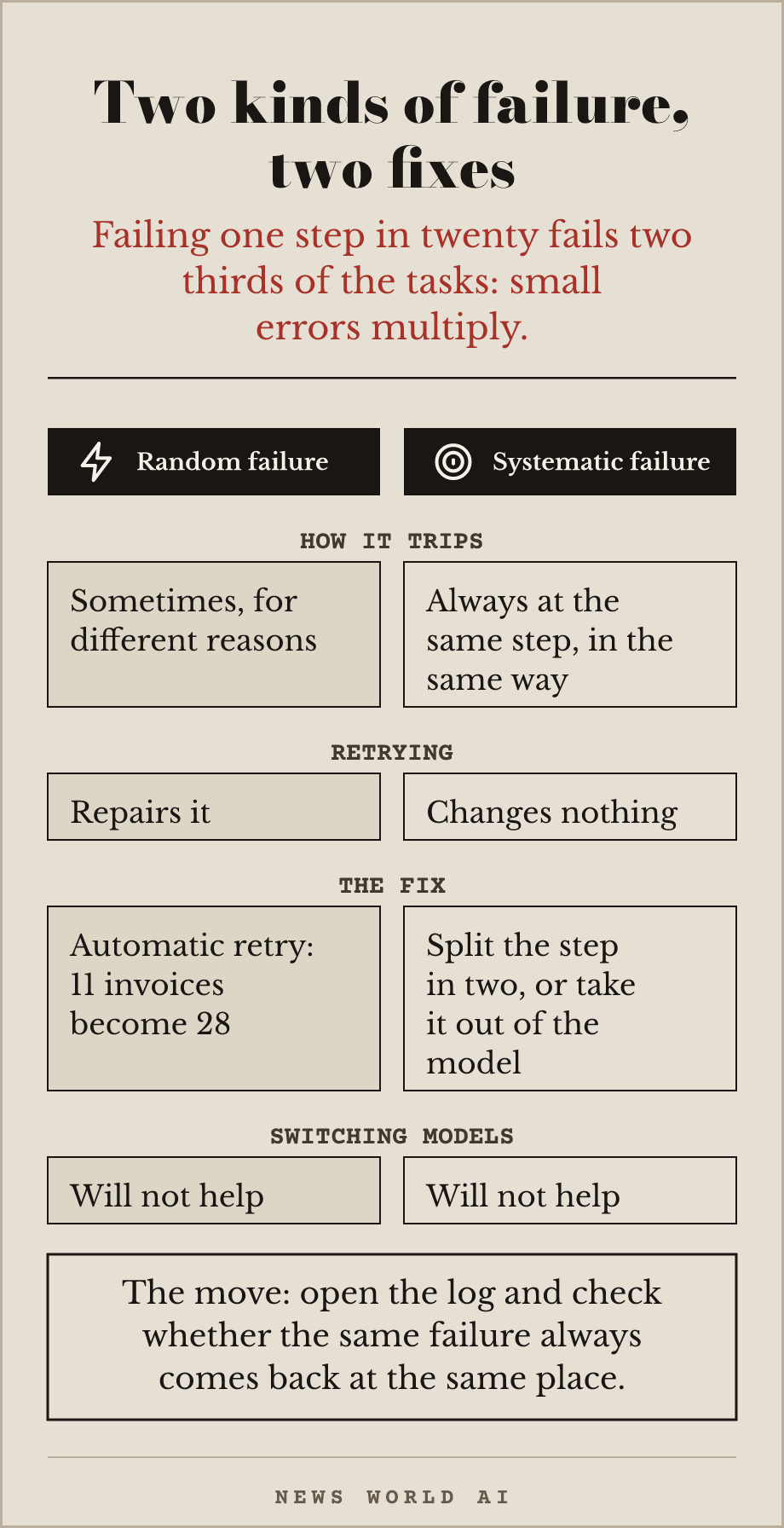
Your agent succeeds one time in three, and the model is not the reason.
An agent that fails one step in twenty fails two thirds of its tasks. That is not bad luck: a long task has to get every step right, and small errors multiply instead of adding up.
Let's keep one concrete case to the end: an agent that processes invoices arriving by email. Read the message, open the attachment, pull the amount, find the supplier, convert the currency, post the entry, acknowledge receipt. Around twenty steps. Out of thirty invoices this month, eleven make it through.
Switching models will not help, and you have no code to write. There are two kinds of failure, and confusing them costs days. Random failure trips sometimes, for different reasons: an automatic retry repairs it, and your eleven invoices become twenty-eight.
Systematic failure trips always, at the same step and in the same way: retrying changes nothing, you have to split the step in two or take it out of the model.
The move, today: open your agent's log and look at whether the same failure always comes back at the same place. That is the whole difference between an hour's repair and a lost week.
→ The four prompts that find where your agent fails, to paste one after the other into your assistant. They list the real steps, add a log, run the task ten times in dry-run mode, and hand back a table that separates the two kinds of failure.
The archive reproduces each issue as it went out, without rewriting it. A repo's stars, prices and last-commit dates are those of the day of the check, not today's: follow the link for the current state.
Geneva, Switzerland. Write to hello@newsworldai.xyz.